Student Academic Management (Teachers)
Attendance, Evaluation & Reports Guide
Teachers: Filling in attendance and evaluating your students
ANGLO uses the name SAM for the documents that are used for Student Academic Management
This guide explains how to use the ‘Student Academic Management’ (SAM) Google Sheet, a link to which your Teaching Manager will send you. This document is used to record your students’ attendance, evaluation, and class profile in one single place.
🔎 Overview of the SAM document
Your Teaching Manager will send you a link to a SAM Google Sheet for each course you will teach: one document for group A and one document for group B for each student intake. You can easily identify this information from the title of the document, for example:🔴 Group A Turn 1 SAM
Or🟢 Group B Turn 2 SAM
⚙️ DASH
When you open the document, you should see the ‘⚙️ DASH’ sheet. Click to view it.
Here you will see the names of the various classes, the level of course material the class will follow, and the name of the teacher assigned to each class. You will also see a classroom assignment* and a link to this document should you need to read it again.
*It is possible that classrooms have not been assigned when you first receive the link to the document. Consult your Manager.

In the example above there are groups: each one has a level, a teacher, a classroom, number of students and the age range of the students.
Class Sheet: Class Info
You can easily identify the name of the group assigned to you. Locate your sheet at the bottom of the document. It will have the group’s name on it (in this example we are using Josh who is teaching Austen group). Click to select it:

You'll find the main information about the class in the top left:
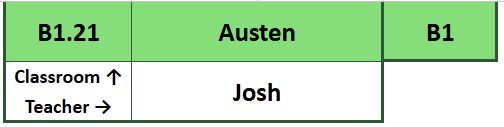
Here you can see confirmation of the classroom (B1.21), group name (Austen), level (B1), group B (the green colour), and the teacher (Josh).
Class Sheet: Student Info
Your students are located in rows 7 to 26 (depending on the number of students in your class*)
*The maximum number of students is 15 (there is space in the register for 20. This is in case students are moved from one class to another. More on this below)
For each student in your class you have their full name, group/group leader name, nationality, ID, age, level and departure date.

Since the Student Academic Management document covers 4 aspects of student management, convenient links are also placed in a prominent location. Simply hover, and click the link to be taken to the part of the sheet you are looking for.